
Last updated on
Nov 6, 2026

SC-SCCA-467 2015-2026 free printable template
We are not affiliated with any brand or entity on this form

Fill out
Complete the form online in a simple drag-and-drop editor.

eSign
Add your legally binding signature or send the form for signing.

Share
Share the form via a link, letting anyone fill it out from any device.

Export
Download, print, email, or move the form to your cloud storage.
Why pdfFiller is the best tool for your documents and forms


End-to-end document management
From editing and signing to collaboration and tracking, pdfFiller has everything you need to get your documents done quickly and efficiently.
Accessible from anywhere
pdfFiller is fully cloud-based. This means you can edit, sign, and share documents from anywhere using your computer, smartphone, or tablet.
Secure and compliant
pdfFiller lets you securely manage documents following global laws like ESIGN, CCPA, and GDPR. It's also HIPAA and SOC 2 compliant.
What is SC-SCCA-467
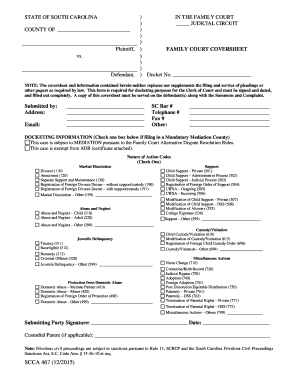
The South Carolina Family Court Coversheet is a legal document used by individuals involved in family court cases to provide necessary docketing information.
pdfFiller scores top ratings on review platforms




User friendly, mobile apps is workable for correction.
So far, so good!
easy to use
VERY GOOD
Fast, helpful assistance from their support team
I forgot to cancel my subscription with them. The money came out unexpectedly, and I was honestly pretty worried because it was the full year's subscription and I have had issues with internet companies not wanting to refund subscription fees in the past even when I asked for it immediately, without using it during the period I asked for the refund for. PDFFiller was great, though. I emailed them early this morning (late for me) and woke up to their response, which was that since it was less than 24 hours after the payment came out, they were able to just void the transaction. Assuming my bank is cool about it, I'll have my money back today.5/5 Do trust.
Great company. No hassles and really quick customer service. Thanks for all your help.
Who needs SC-SCCA-467?
Explore how professionals across industries use pdfFiller.

SC-SCCA-467 is needed by:
-
Individuals filing family court actions in South Carolina
-
Defendants in family court cases requiring a coversheet
-
Attorneys representing parties in family court proceedings
-
Legal practitioners needing to ensure proper filing procedures
-
Court staff managing family court submissions
Comprehensive Guide to SC-SCCA-467
What is the South Carolina Family Court Coversheet?
The South Carolina Family Court Coversheet serves a crucial function in family court legal proceedings. It aids in docketing family court cases by providing essential details for accurate record-keeping. The coversheet includes specific fields such as 'Submitted by', 'SC Bar #', 'Address', 'Telephone #', 'Fax #', 'Email', and 'Other'. Furthermore, it contains a section for the 'Submitting Party Signature' and 'Date', ensuring proper identification of cases.
Purpose and Benefits of the South Carolina Family Court Coversheet
The family court coversheet is vital in initiating family court actions, as it encapsulates key information necessary for judges and court staff. By utilizing the coversheet, individuals ensure accurate identification and tracking of their cases throughout the legal process. Using tools such as pdfFiller can greatly simplify the submission process, allowing users to fill out the form efficiently and conveniently.
Key Features of the South Carolina Family Court Coversheet
The South Carolina Family Court Coversheet is designed with various essential features. Users will find:
-
Multiple fillable fields for submitting complete information.
-
Nature of action codes to indicate the type of case being filed.
-
A required signatory certification by the submitting party.
-
Instructions to fill out the form completely, mitigating processing delays.
Who Needs the South Carolina Family Court Coversheet?
This document is necessary for individuals filing family court actions within South Carolina. The eligibility criteria determine who must submit the coversheet, identifying parties who qualify as 'submitting parties'. Understanding these requirements is crucial to ensure compliance with court protocols.
When and How to File the South Carolina Family Court Coversheet
Filing the Family Court Coversheet involves specific timing and procedures:
-
Ensure you complete the coversheet before submitting your family court documents.
-
Fill out the form online using available platforms to enhance accuracy.
-
Submit the coversheet alongside other required documents such as the Summons and Complaint.
Common Errors when Submitting the South Carolina Family Court Coversheet
Filling out the coversheet can sometimes lead to errors. Common mistakes include:
-
Omitting required information in fillable fields.
-
Failing to check the nature of action codes.
-
Not signing the form where indicated.
To prevent these pitfalls, users should implement a review and validation checklist before final submission.
How to Sign the South Carolina Family Court Coversheet
Signing the coversheet involves understanding the requirements for signatures. Users must choose between digital signatures and wet signatures based on their submission method. The signature field is essential, ensuring that the submitting party has authorized the content. If applicable, notarization may be required for certain submissions.
Submission Methods for the South Carolina Family Court Coversheet
Several submission options are available for the family court coversheet:
-
In-person submissions at family court locations.
-
Online submissions through designated government platforms.
-
Mail submissions to the appropriate court address.
It's also important to track your submitted coversheet and be aware of any associated fees and processing times for different submission methods.
What to Expect After Submitting the South Carolina Family Court Coversheet
Once the coversheet is submitted, there are several next steps. Users can:
-
Check the status of their submission online or through court contact.
-
Understand potential issues that could arise during processing.
-
Follow guidelines to correct or amend the coversheet if necessary.
Enhancing Your Experience with pdfFiller
pdfFiller offers significant benefits for users filling out the Family Court Coversheet. By providing a user-friendly interface for completing, signing, and managing this legal form, pdfFiller ensures that users experience a hassle-free submission process. Additionally, the security compliance of the platform protects sensitive information throughout the document management lifecycle.
How to fill out the SC-SCCA-467
-
1.To access the South Carolina Family Court Coversheet on pdfFiller, visit the platform and log in to your account or create a new one if you don't have an existing account.
-
2.Once logged in, use the search bar to type 'South Carolina Family Court Coversheet' and select it from the results to open the document.
-
3.Before starting, gather all necessary information, such as your contact details, SC Bar number if applicable, and details about the nature of your action.
-
4.Begin filling the form by clicking on each fillable field. Enter your name, SC Bar number, address, telephone number, fax number, and email address where indicated.
-
5.For the 'Nature of Action Codes', select the appropriate checkboxes to label the action accurately.
-
6.Ensure you include your signature in the designated field, confirming that the information provided is true and complete.
-
7.Carefully review all entered information for accuracy, making necessary corrections before you finalize the form.
-
8.Once satisfied, click on the save icon to keep a copy of the completed form or choose to download it directly to your device.
-
9.If necessary, you can submit the form electronically via pdfFiller or print it out to serve it to the defendant along with the Summons and Complaint.

Who is required to sign the South Carolina Family Court Coversheet?
The submitting party is required to sign the South Carolina Family Court Coversheet. This ensures that all provided information is accurate and complete.
Are there any deadlines for submitting the Family Court Coversheet?
Yes, the Family Court Coversheet should be submitted along with the Summons and Complaint. Ensure submission is timely to comply with court deadlines for your family court case.
What happens if the Family Court Coversheet is incomplete?
If the Family Court Coversheet is incomplete, it may result in delays or rejections of your filing by the court. Always fill it out completely and accurately.
What should I include with the Family Court Coversheet when filing?
You must submit the Family Court Coversheet along with the Summons and Complaint to the court. Ensure that all documents are prepared and have the required signatures.
How can I avoid common mistakes when filling the Family Court Coversheet?
To avoid mistakes, double-check the accuracy of all entered information, ensure proper signatures are included, and verify that all required fields are completed before submission.
Is notarization required for the Family Court Coversheet?
No, notarization is not required for the South Carolina Family Court Coversheet. You only need to sign the document as the submitting party.
Related Forms



Get the latest insights from our blog


If you believe that this page should be taken down, please follow our DMCA take down process
here
.
This form may include fields for payment information. Data entered in these fields is not covered by PCI DSS compliance.